

Coupons
Where: Marketing > Coupons
Who can use it: Permission: marketing.manage_coupons, marketing.view or manage marketing. Not available on SureScreen (menu board only) plans.
Open this page in SureTill
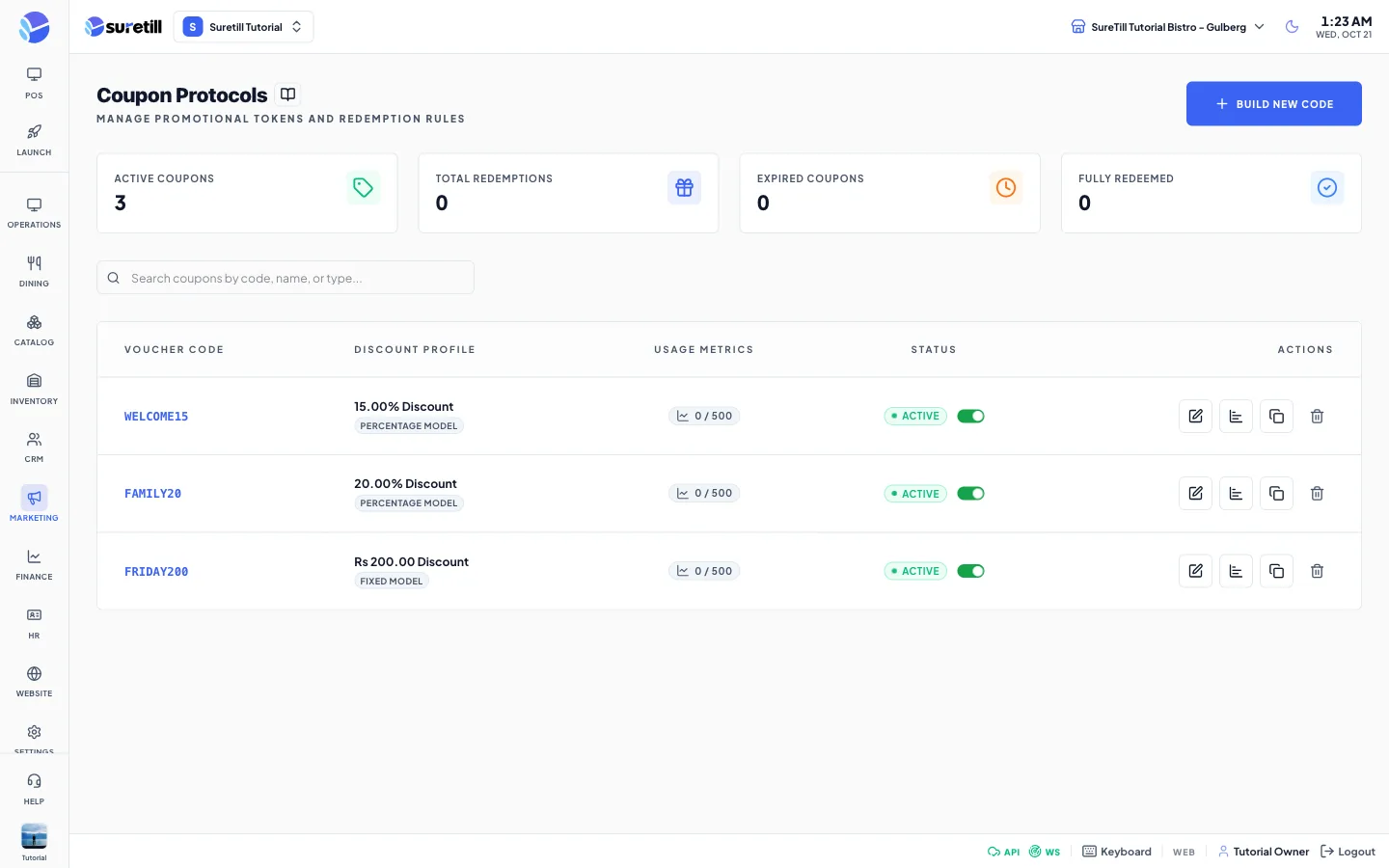
A coupon is a promo code. The customer types it at the checkout of your online storefront or on the QR table ordering page, and the app takes the discount off the order. Each time a code is used the app records it, so you can see who used it and how much it saved.
How a coupon is checked
Section titled “How a coupon is checked”- The code must be active.
- If the coupon has a start date it must have started, and if it has an end date it must not have ended.
- If the coupon has a usage limit, the number of uses must be below it.
- If it has a minimum order amount, the order must reach it.
- If it has a limit per customer, the customer must not have used it that many times.
- Percentage coupons take that percent of the order subtotal. Fixed coupons take the fixed amount. The discount can never be more than the order subtotal, and it is cut to the maximum discount if one is set.
- A Free Item coupon takes no money off the price in this version.
Step by step
Section titled “Step by step”Create a coupon
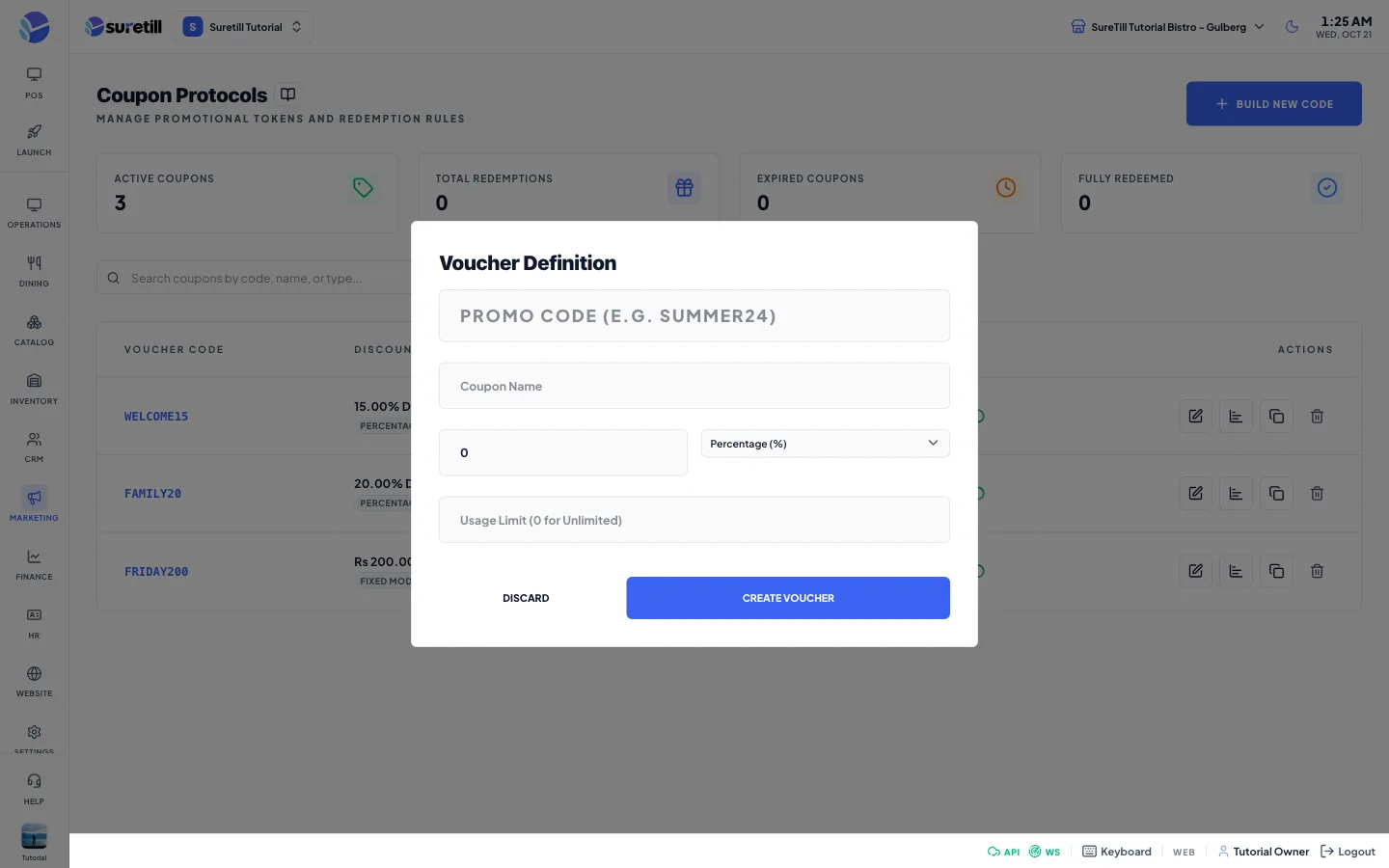
Section titled “Create a coupon”- Open Marketing > Coupons and click Build New Code.
- Type the Promo Code, for example SUMMER24. It must be unique and up to 50 characters.
- Type the Coupon Name.
- Type the Value and pick the Type: Percentage (%), Fixed Amount, or Free Item.
- Type a Usage Limit, or leave it empty (or 0) for unlimited. A number must be 1 or more.
- Click Create Voucher.
Edit a coupon
Section titled “Edit a coupon”- Click the pencil button on the row.
- Change the name, value, type or usage limit and click Update Voucher.
Switch a coupon off or on
Section titled “Switch a coupon off or on”- Use the switch in the Status column.
- Disabled coupons are refused at the checkout.
See the usage
Section titled “See the usage”- Click the bar chart button on the row.
- The Coupon Usage History lists the customer (or Guest), the order, the discount given and the date.
Duplicate or delete
Section titled “Duplicate or delete”- Click the copy button to make a copy. The copy gets the code of the original followed by _COPY_ and a number. Change what you need on the copy.
- Click the bin button and confirm Delete Coupon to remove a coupon. This cannot be undone.
Every setting explained
Section titled “Every setting explained”| Setting | What it does |
|---|---|
| Active Coupons card | Coupons with the switch on. |
| Total Redemptions card | Total number of times all codes were used. |
| Expired Coupons, Fully Redeemed cards | Expired counts coupons that are on but whose end date has passed. Fully Redeemed counts coupons that are on and have reached their usage limit. |
| Search box | Finds a coupon by code, name or type. |
| Voucher Code | The promo code. |
| Discount Profile | The value (a percent or a money amount) and the type: Percentage, Fixed or Free Item. |
| Usage Metrics | Times used, then the limit, for example 12 / 100 or 3 / Unlimited. |
| Status | Active, Disabled, Expired (end date passed) or Redeemed (limit reached), with the switch. |
| Promo Code (form) | Required, unique, up to 50 characters. Locked after the coupon is created. |
| Coupon Name (form) | Required, up to 255 characters. |
| Value (form) | Number, 0 or more. A percentage coupon takes that percent. |
| Type (form) | Percentage (%), Fixed Amount (shown with your currency symbol) or Free Item. |
| Usage Limit (form) | Total times the code can be used. Empty or 0 means unlimited. A number must be 1 or more. |
| Pencil, bar chart, copy, bin buttons | Edit, usage history, duplicate and delete. |