

Rider Settlement
Where: Finance > Rider Settlement
Who can use it: To open the page: delivery.view_settlement or delivery.view. To settle or pay: owner or admin, or the permission settlements.process or delivery.process_settlement. Other users see View Only. The Settle button follows exactly the same rule as the server.
Open this page in SureTill
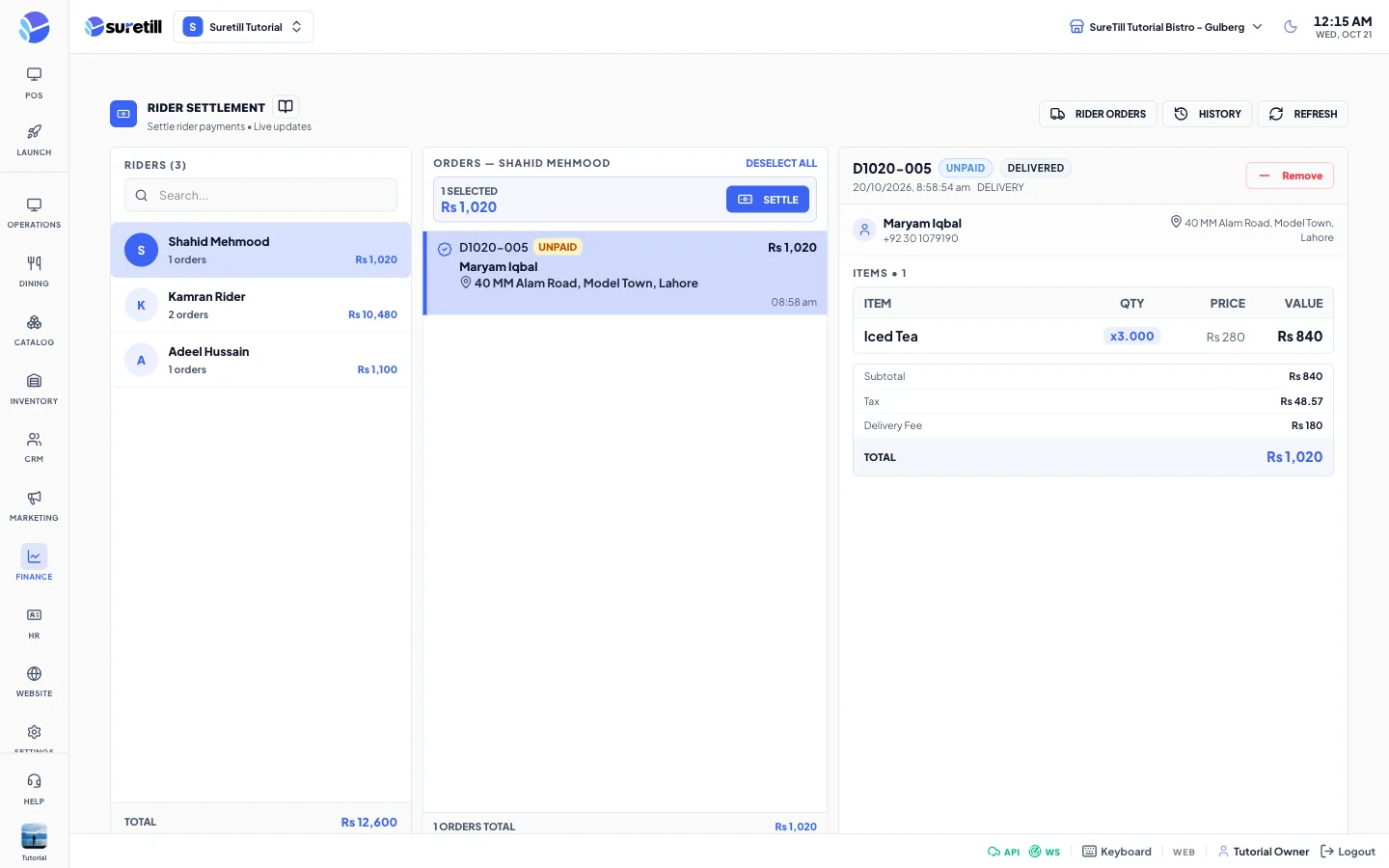
A rider delivers an order and brings back the cash. Until you settle it, the order stays on the rider’s list. This screen shows each rider with the orders they still owe, lets you pick the orders, and records the payment. The same screen is also the Mass Pay / Settlements tab of the Delivery page.
What appears in the list
Section titled “What appears in the list”- Orders that were given to a rider on a delivery record.
- Not yet settled.
- Not cancelled or refunded, with a total above zero.
- Payment status not paid, settled or account.
When nothing is owed you see ‘All Settled’. The list updates by itself when a rider is assigned or an order changes. You can also press Refresh.
Step by step: settle a rider
Section titled “Step by step: settle a rider”- Pick the rider in the left column. Their orders open in the middle column, all selected.
- Click an order to see its customer, items and totals on the right. Use the circle on a row, Add to Settle or Remove to include or leave out an order. Select All and Deselect All handle the whole list.
- Check the selected count and amount at the top of the middle column, then press Settle.
- In the payment window, on Single Payment, choose the method on the right (Cash is chosen by default).
- Type the Cash Received with the keypad, or use 100, 500, 1000 or 5000, or Exact. The window shows Change or Due for you.
- Optionally add a settlement note.
- Press Paid & Settle.
Paid & Settle creates a settlement with its own number, records the payments, marks the orders settled, completes the orders and the kitchen tickets, and frees the table if the order had one and no other order is open on it. You find the result in History.
Step by step: split between methods
Section titled “Step by step: split between methods”- In the payment window press Split Payment.
- Choose a method and an amount on each row. Use Add Payment Method for more rows, or Split Equally to share the amount still to collect.
- You need at least 2 methods. The Split Total line shows your split against the amount still to collect and turns green when they match. For an order that is already part paid, that amount is the remaining balance, not the order total.
- Press Paid & Settle. The buttons stay disabled until the split matches.
Mark Paid or Paid & Settle
Section titled “Mark Paid or Paid & Settle”| Button | What it does |
|---|---|
| Paid & Settle | Records the payment, creates a settlement record with a number, completes the order and frees the table. Use this at the end of the shift. |
| Mark Paid | Records the payment and marks the order paid, but creates no settlement record and does not complete the order. |
Step by step: check what a rider delivered
Section titled “Step by step: check what a rider delivered”- Press Rider Orders at the top. A full-screen window opens.
- Pick a rider on the left (use Search rider). Riders who have nothing to settle are listed too.
- Choose All time, Today or Current work period.
- Click an order to see items (voided lines are struck through), totals, and its settled or payment state.
- Use Load to POS to open the order on the register, or Print Bill.
Every setting explained
Section titled “Every setting explained”| Item | What it does |
|---|---|
| Rider Orders | Audit window described above. |
| History | Shows the latest 50 settlements: settlement number, rider, number of orders, total and date. |
| Refresh | Reloads the list. |
| Riders column | Search box, each rider with their order count and amount, and a grand total. |
| Orders column | Select All / Deselect All, selected count and amount, Settle (or View Only). Each row shows the order number, table, payment state, total, customer, address and time. |
| Order details column | Customer, delivery address, items (Item, Qty, Price, Value) and the money breakdown: Subtotal, Tax, Service Charge, Delivery Fee, Tip, Discount, Total. |
| Single Payment / Split Payment | One method for everything, or several methods with amounts. |
| Cash Received | Amount the rider handed over. Stored with the settlement. |
| Settlement notes | Optional text saved with the settlement. |
| Method list | All active payment methods. |