

Settlements
Where: Finance > Settlements
Who can use it: Permission: payments.view or view reports. Creating a settlement needs the owner, admin or super admin role, or the settlements.process or delivery.process_settlement permission.
Open this page in SureTill
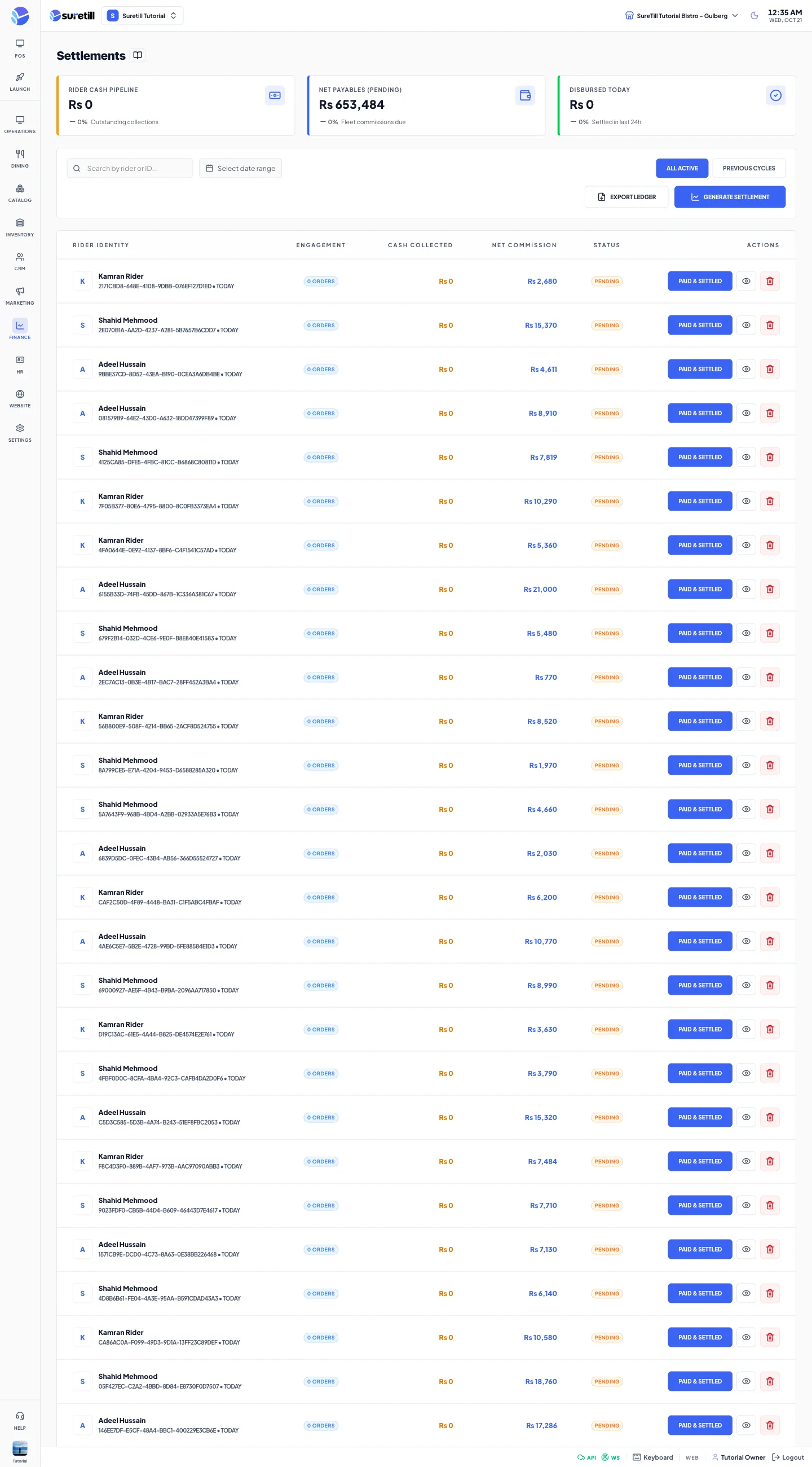
A settlement groups the delivery orders of one rider that were collected together. The normal way to settle a rider is the Rider Settlement page, which lists the pending orders per rider and takes the cash. Each time that page settles a batch, a settlement record is saved. This page lists those records.
What happens to the money when a batch is settled (on the Rider Settlement page): the remaining amount of each order is recorded as a completed payment, so the payment ledger and the reports stay right. The order is marked Settled, completed, and its table is freed. Orders paid on account get no payment and stay on account.
All Active lists one Pending row for each rider who has delivery orders not yet settled, with the number of orders and their total value. Previous cycles lists the batches that were settled, with the cash received. A settlement record exists only once the batch is settled, so a saved record is always Paid.
Step by step
Section titled “Step by step”Find a settlement
Section titled “Find a settlement”- Open Finance > Settlements.
- Type a rider name or part of the id in the search box.
- Use the date range to limit by the day it was processed.
- Choose the tab All Active (riders waiting to be settled) or Previous cycles (settled batches).
Settle a rider
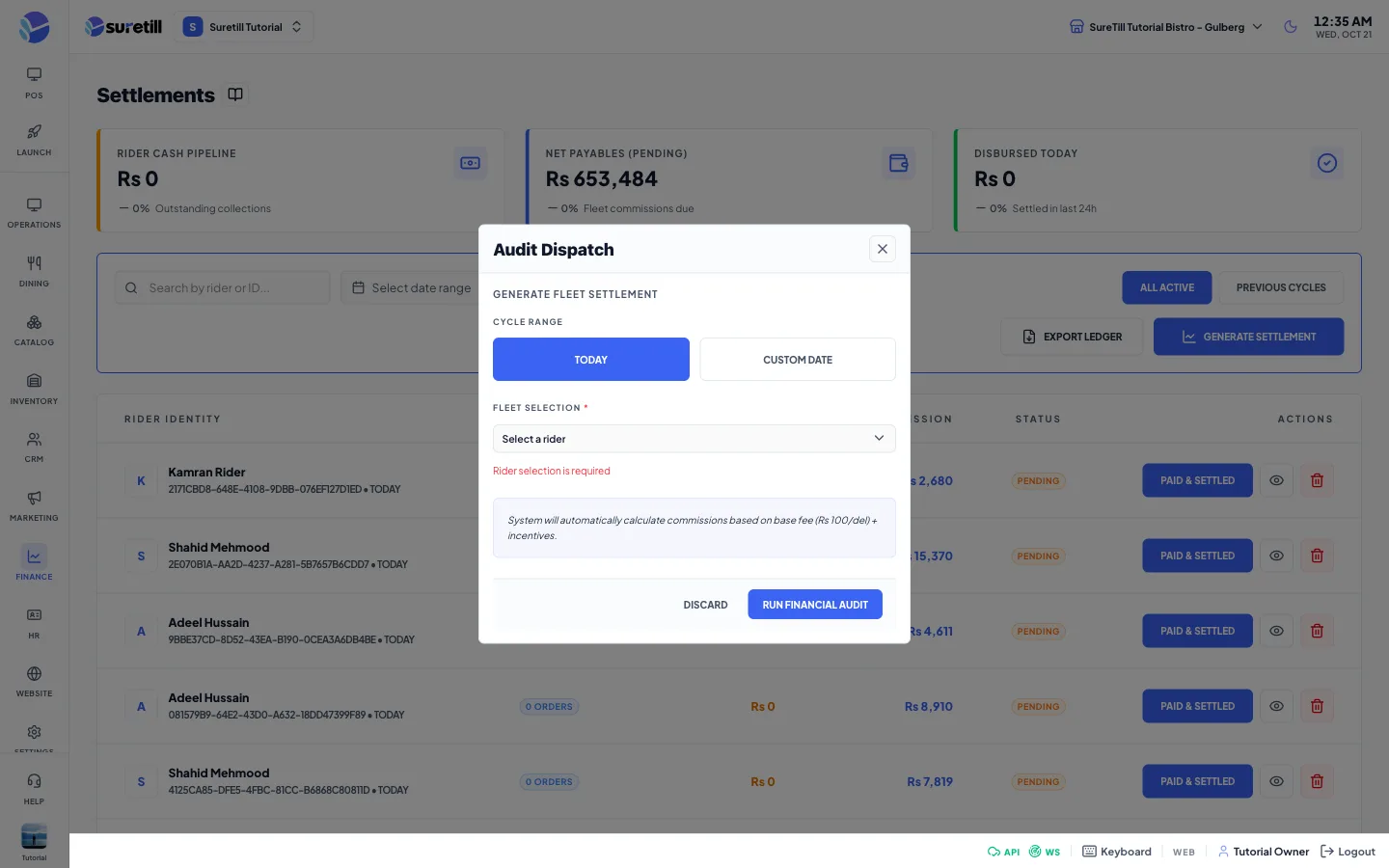
Section titled “Settle a rider”- On the Pending row of the rider click Paid & Settled, or click Generate Settlement and pick the rider.
- In the Audit Dispatch window check the rider, pick the payment method used to collect the money (Cash is chosen for you when it exists) and check the Cash received from rider. It is filled with the total value of the orders.
- Click Run Financial Audit.
- The server settles all the pending orders of that rider together. For every order it records the missing payment with the method you chose, marks the order paid, completes it and frees the table. The difference between the cash received and the order value is saved on the batch.
- If the batch cannot be settled the whole action is rolled back and you see the reason. You need the owner, admin or super admin role, or the settlements.process or delivery.process_settlement permission.
Open the detail
Section titled “Open the detail”- Click the eye icon.
- The Settlement Details window shows Rider, Status, Reference (the settlement number), Orders, Cash Received, Orders Value and the processed time.
Delete a settlement record
Section titled “Delete a settlement record”- Click the red trash icon.
- Read the message This will permanently remove the settlement record and click Delete.
Every setting explained
Section titled “Every setting explained”| Setting | What it does |
|---|---|
| Rider Cash Pipeline | Total value of the orders of all riders who are waiting to be settled. |
| Orders Awaiting Settlement | Number of those orders. |
| Disbursed Today | Cash received from riders in batches settled today. |
| Search | Matches the rider name or the id. |
| Date range | Limits settled batches by the day they were settled. Pending rows are always shown. |
| All Active / Previous cycles | Riders waiting to be settled, or settled batches. |
| Export Ledger | Saves settlements_export.csv with ID, Rider, Reference, Orders, Cash Received, Orders Value and Status for the rows now listed. |
| Generate Settlement | Opens the Audit Dispatch window. |
| Rider (required) | A rider who has orders waiting to be settled. The window says No riders awaiting settlement when there is none. |
| Collected with (required) | The payment method recorded for the money still due on the orders. |
| Cash received from rider | The cash the rider handed in. The default is the total value of the orders. |
| Run Financial Audit | Settles all the pending orders of the chosen rider as one batch. |
| Rider Identity | The rider name and the settlement number. |
| Engagement | The number of orders in the batch. |
| Cash Received | Cash the rider handed in. Shown as a dash on a pending row. |
| Orders Value | Total value of the orders of the batch. |
| Status | Pending (rider waiting) or Paid (settled batch). |
| Paid & Settled | Pending rows only. Opens the Audit Dispatch window for that rider. |
| Eye / Trash icons | Settled batches only. Open the detail or delete the record. |