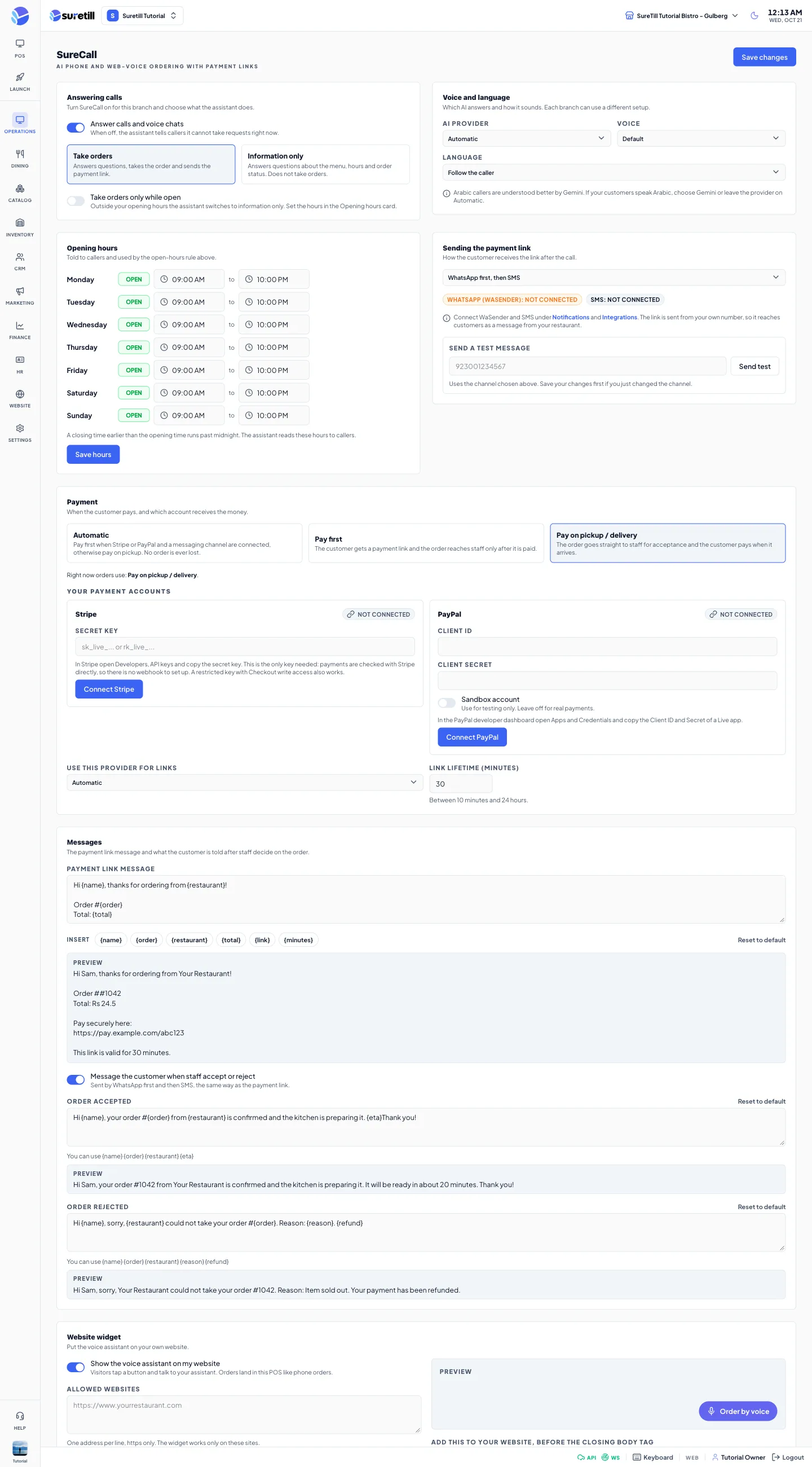
Where: Operations > SureCall Who can use it: Permission settings.view. SureCall is an add-on: the menu item shows only when your plan includes it. Phone numbers are attached by SureTill support. The website widget works on SureTill cloud only. Open this page in SureTill
When a customer calls your number or talks to the Order by voice button on your website, the assistant greets them, answers questions about your menu and opening hours, takes the order, and creates a real order in SureTill. Prices always come from your menu on the server.
Settings are per branch. Each branch can use a different voice, language, payment rule and message text.
A SureCall number or website widget must be attached to your restaurant. Phone numbers are added, changed or ported by SureTill support. The Number setup card on the page says the same.
For Pay first you need Stripe or PayPal connected (see Payment below) and WhatsApp (WaSender) or an SMS gateway connected, so the link can reach the customer.
Connect WaSender under Notifications and SMS under Integrations. The page links to both.
Set your opening hours (the Opening hours card) so the assistant can tell callers.
Uses Pay first when a payment account and a messaging channel are both connected. Otherwise it uses Pay on pickup, so no order is lost. The line ‘Right now orders use’ shows which one is active. This is the default.
Pay first
The caller gets a payment link by message. The kitchen only hears about the order after the customer has paid and staff have accepted it.
Pay on pickup / delivery
No link. The order goes straight to the staff popup. The customer pays when they collect or when the rider arrives.
If a payment link cannot be created (no gateway, or the provider refuses), the order falls back to Pay on pickup. The assistant tells the caller they pay on pickup, and staff still see the order. If the link cannot be sent, the assistant reads the link to the caller or asks for another number.
Every phone or website order that needs a decision raises a popup with a sound on admin and POS screens for owners, admins and anyone with POS access. The sound repeats every 8 seconds until someone answers. If several orders wait, the popup shows how many more are queued.
Read the popup: New phone order or New website order, Delivery or Takeaway, customer name and phone, items with add-ons and notes, scheduled time, total.
The badge says Paid online, Pay on delivery or Pay on pickup.
Press Accept & send to kitchen. The order goes to the kitchen screen and a kitchen ticket prints. An order scheduled for later is held and released to the kitchen when its time is near.
Or press Reject, choose a reason (Item sold out, Kitchen is closed, Too busy right now, Cannot deliver to that address) or type your own (at least 2 characters), and press Reject order.
Automatic (Gemini for Arabic, Grok for other languages), Grok (fast and natural in English) or Gemini (recommended for Arabic). Changing the provider resets the voice.
Voice
Default or a named voice. Grok voices: Eve, Ara, Luna, Iris, Liora, Aurora, Celeste, Carina, Naksh. Gemini voices: Puck, Kore, Sulafat, Zephyr, Charon, Aoede, Fenrir, Leda. Disabled while the provider is Automatic.
Language
Follow the caller (default), or English, Arabic, Urdu, Hindi, Persian, Turkish, French, Swedish, Bengali.
One row per day. Click Open or Closed to switch a day and set the open and close time (default 09:00 to 22:00). A closing time earlier than the opening time runs past midnight. The assistant reads these hours to callers and uses them for the open-hours rule. Press Save hours. This card saves on its own and updates the branch operating hours, so it is separate from Save changes.
WhatsApp first, then SMS (default; falls back to SMS if WhatsApp fails), WhatsApp only, or SMS only.
WhatsApp / SMS badges
Show whether WaSender and an SMS gateway are connected for this branch.
Send a test message
Type a phone number with country code, for example 923001234567, and press Send test. It sends one real message with the channel you chose and tells you whether WhatsApp or SMS delivered it. Save first if you just changed the channel.
Automatic, Pay first, Pay on pickup / delivery (see the table above).
Your payment accounts
Stripe: paste the secret key (sk_live or a restricted rk_live key with Checkout write access). No webhook is needed. PayPal: paste Client ID and Client secret of a Live app; tick Sandbox account only for testing. Money goes straight to your own account. Keys are stored encrypted and never shown again.
Test connection / Replace keys / Disconnect
Test checks the saved keys. Replace keys lets you enter new ones. Disconnect removes the account at once, without a confirmation box.
Use this provider for links
Automatic (whichever is connected), Stripe or PayPal.
Link lifetime (minutes)
How long a payment link stays valid. From 10 minutes to 24 hours. Default 30. An unpaid order is cancelled automatically when its link expires.
Text sent with the link, up to 600 characters. Click a chip to insert {name}, {order}, {restaurant}, {total}, {link} or {minutes}. A live preview uses sample values. Reset to default restores the original.
Message the customer when staff accept or reject
When on, the customer gets a WhatsApp or SMS after the decision, by the same channel. It needs a phone number on the order. Default on.
Order accepted
Tokens {name} {order} {restaurant} {eta}. {eta} becomes ‘It will be ready in about N minutes.’
Order rejected
Tokens {name} {order} {restaurant} {reason} {refund}. {refund} says the payment has been refunded when it was.
Turns the Order by voice button on. Save widget stores the widget settings. This card saves on its own.
Allowed websites
Up to 10 https addresses, one per line. The widget works only on these sites.
Button text
2 to 30 characters. Default Order by voice.
Colour / Position
Button colour, and Bottom right or Bottom left.
Greeting language / Greeting
The language of the first greeting, and an optional greeting text up to 300 characters.
Snippet, test page, page link
After you save with the widget on, copy the one-line snippet into your site before the closing body tag, try the sample page, or share the full page link.
Plan and usage
Call minutes used this month against your plan, the monthly price, and a warning near the limit. When the limit is reached SureCall stops answering until next month. Extra minutes beyond the included ones are charged per minute when the plan has no cap. Until SureTill sets a plan up, the card says so.
Live orders
A table of orders waiting for staff or for the customer to pay: order, customer, total, state (Needs acceptance or Awaiting payment), payment (Paid or Not paid), link status and channel. It refreshes every 20 seconds.
Resend link
For an order awaiting payment. Enter the phone number (a corrected one if needed) and press Send. An expired link is replaced by a new one.