

Accounting
Where: Finance > Accounting
Who can use it: Permission: reports.view or view reports.
Open this page in SureTill
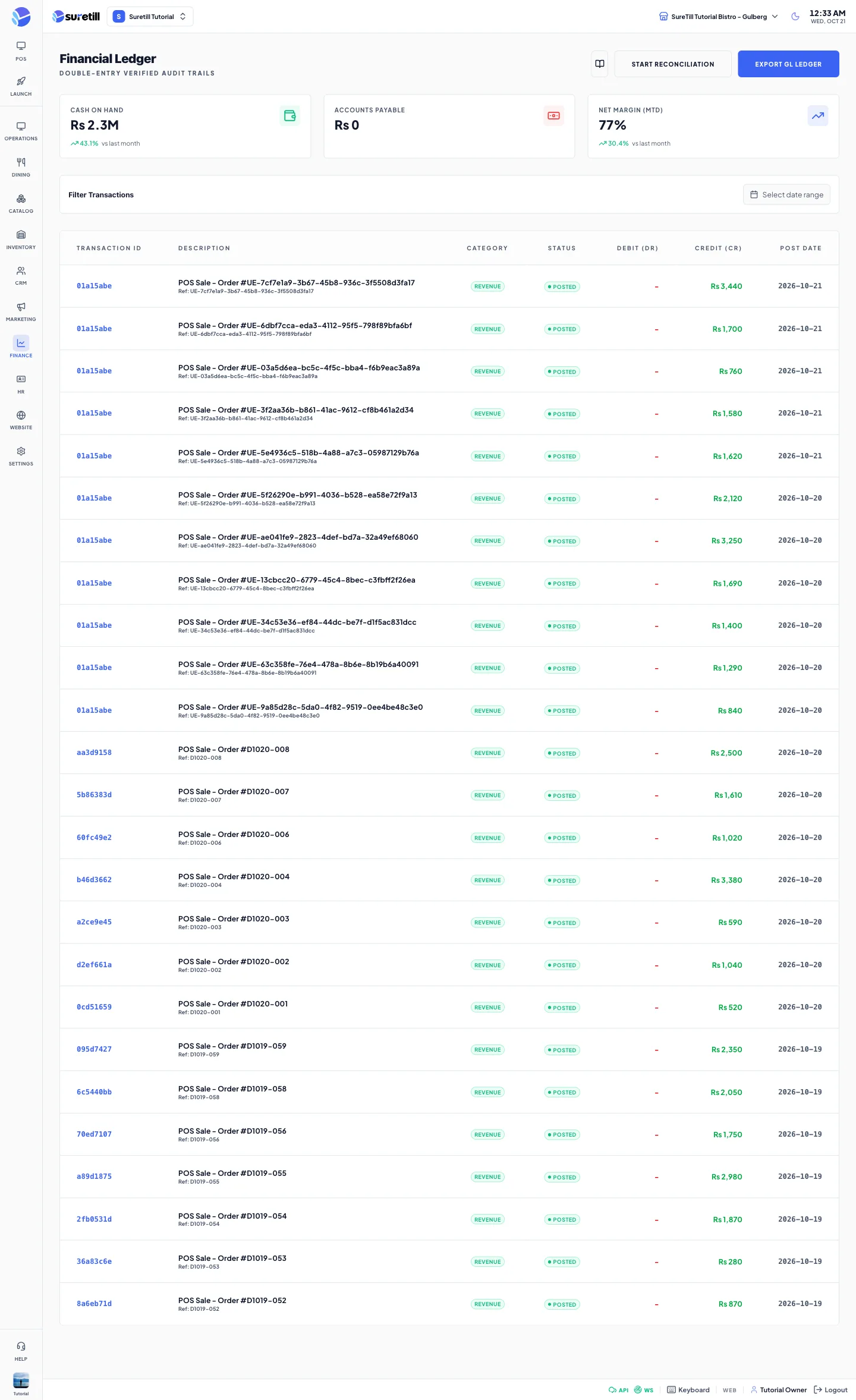
Accounting joins two sources for the selected branch: orders with payment status Paid (shown as credits) and expenses (shown as debits). It is a cash view for the owner. It is not a full chart of accounts.
How the numbers are computed
Section titled “How the numbers are computed”- Cash on Hand = the total of all Paid orders ever, minus all expenses that are Approved or Posted. Pending and rejected expenses are not subtracted.
- Accounts Payable = the total of expenses that are still Pending.
- Net Margin (MTD) = (revenue this month minus this month expenses) divided by revenue this month, as a percent with one decimal. Rejected expenses are left out. Revenue is the total of Paid orders created this month.
- The trend under Cash on Hand is the percent change of revenue this month compared with last month. The trend under Net Margin is the change in percentage points compared with last month.
- Orders with payment status Settled (paid through a rider settlement) are not in this ledger.
Step by step
Section titled “Step by step”Read the ledger for a period
Section titled “Read the ledger for a period”- Open Finance > Accounting.
- In Filter Transactions pick a start and an end date. Leave them empty to see the newest entries.
- Read the table. Credits are green and debits are red.
Reconcile pending expenses
Section titled “Reconcile pending expenses”- Click Start Reconciliation.
- Read the question. It says it will mark all pending expense entries as reconciled.
- Click Reconcile. A message tells you how many entries were changed.
Export the ledger
Section titled “Export the ledger”- Optionally set the dates.
- Click Export GL Ledger.
- A file ledger-export-DATE.csv is saved with the columns Ref, Description, Category, Amount, Type and Date. If there are no entries you see No entries to export.
Every setting explained
Section titled “Every setting explained”| Setting | What it does |
|---|---|
| Cash on Hand | See the formulas above. Shown with the currency symbol, and in millions (M) above one million. |
| Accounts Payable | Pending expenses total. |
| Net Margin (MTD) | Month to date margin in percent. |
| Filter Transactions | Start and end date for the table and for the export. The cards are not affected. |
| Transaction ID | The first 8 characters of the internal id. |
| Description | POS Sale - Order # and the number for revenue, or the expense title for expenses. The line below shows Ref, the order number or expense number. |
| Category | Revenue for orders. For expenses the expense category name, or Operations when there is none. |
| Status | posted for orders. For expenses the expense status (pending, approved, rejected). Pending entries pulse. |
| Debit (DR) | Expense amounts. |
| Credit (CR) | Paid order totals. |
| Post Date | The order date or the expense date. |
| Start Reconciliation | Approves all pending expenses of the branch. |
| Export GL Ledger | Downloads all matching revenue and expense lines as CSV. In the file every expense has the category Operations. |