

Activity Logs (System Ledger)
Where: Settings > Activity Logs
Who can use it: Permission: settings.view_logs, settings.view or manage settings. Not available on SureScreen plans.
Open this page in SureTill
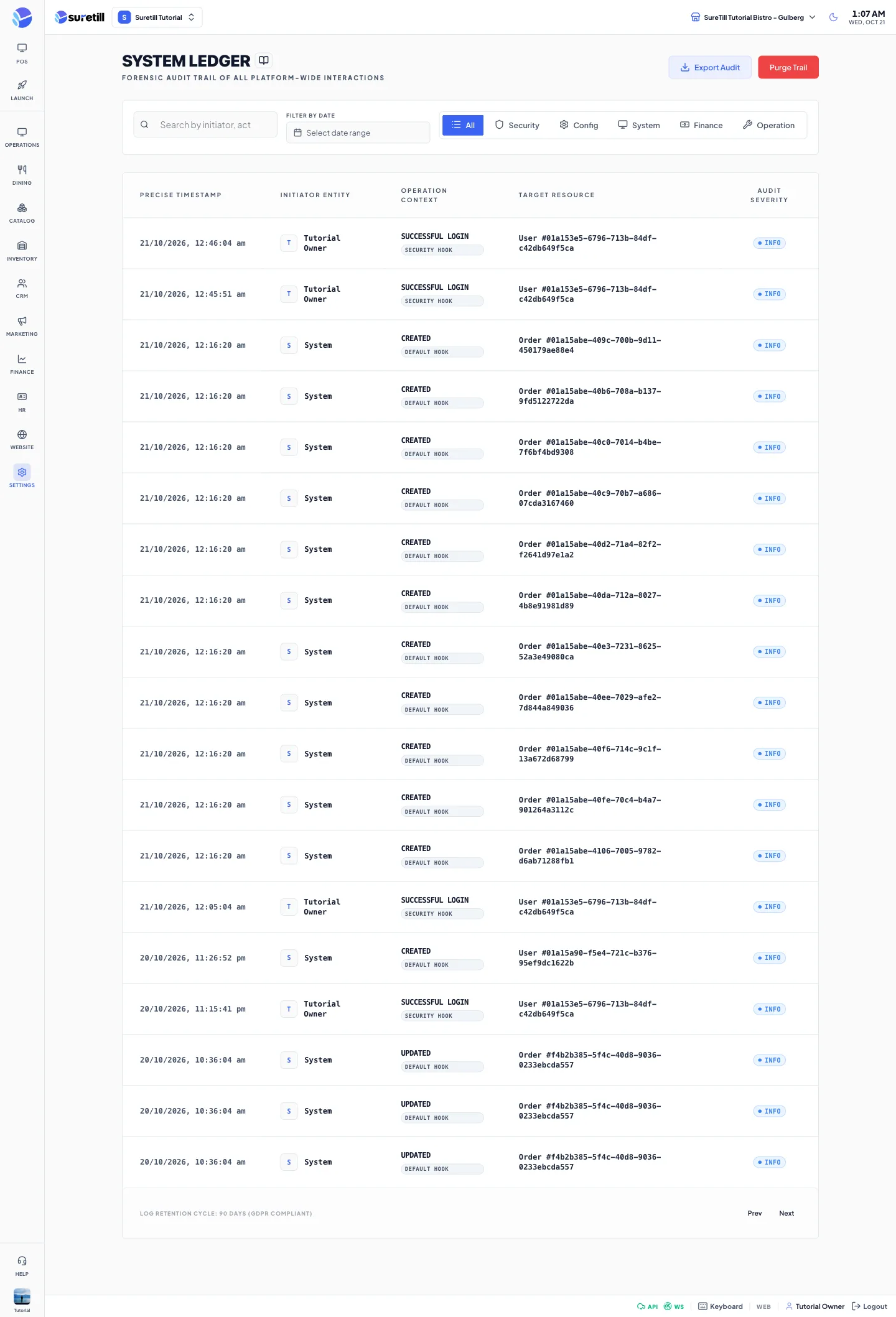
The page title is System Ledger. It lists the entries of the activity log, newest first. Use it to answer questions such as who voided this item, who unlocked this ticket, or who changed this user.
What is recorded
Section titled “What is recorded”- Voids: item_voided and order_voided, with the reason that was typed.
- Unlocked tickets: order_unlocked, when a printed bill was unlocked for changes.
- Orders: changes of the status, the payment status or the total.
- Users: changes of name, email, status or branch.
- Sign-ins in the Security category: Successful login, Failed login attempt, Login denied: account inactive and Account locked after 5 failed attempts.
- Entries written by automations that use the Log activity action.
Step by step
Section titled “Step by step”Find an entry
Section titled “Find an entry”- Open Settings > Activity Logs.
- Type part of a user name, an action or a resource in the search box.
- Pick a category tab: All, Security, Config, System, Finance or Operation.
- Set the Filter by Date range to narrow it down.
- Click a row to open the Audit Log Detail window.
Read the detail window
Section titled “Read the detail window”The window shows the Log ID, the Action, the User, the Resource (the record type and its number), the Category and the Timestamp. Below it a table called Changed Attributes lists each field with its old value in red and its new value in green, when the change was recorded.
Every setting explained
Section titled “Every setting explained”| Setting | What it does |
|---|---|
| Search | Matches the initiator, the action and the target resource. The server does the search, so it covers all entries, not only the page you see. |
| Filter by Date | From and To dates. Only entries inside the range are listed. |
| Category tabs | All, Security, Config, System, Finance, Operation. They match the category (log name) of each entry. |
| Precise Timestamp | The date and time of the entry. |
| Initiator Entity | The user who did it, or System when no user is known. |
| Operation Context | The action text and a category badge. |
| Target Resource | The kind of record and its number, for example Order #123. |
| Audit Severity | Info or Warning. The log does not store a severity, so denied, failed, locked and blocked sign-in entries show Warning and everything else shows Info. |
| Export Audit | Saves a CSV file of the rows currently shown (time, user, action, category, resource, severity). |
| Prev, Next | Shown at the bottom with the page number. Each page holds 100 entries. |