
Ask any owner what their restaurant billing software should do and the list is always longer than "print a bill". It has to seat and clear tables, split a family's cheque, get the order to the right station in the kitchen, know that a plate of biryani just used a portion of rice, remember which regular is on udhaar, and close the drawer at night without a shortfall. A restaurant POS in Pakistan earns its place by doing all of that in one system, and surviving the conditions we actually trade in.
Running the floor: tables, orders and bills
Service is where a POS is judged. Good restaurant POS software gives you a live table plan, who's seated, who's waiting for their bill, which table just turned, so the floor staff move faster and the manager can read the room at a glance. It handles dine-in, takeaway and delivery from the same screen, because most Pakistani restaurants do all three at once. Modifiers ("no chilli", "extra raita"), splitting a bill across a group, merging tables, moving an order to another table, holding and recalling a ticket, these are the small mechanics that either flow or fight you during a rush.
The test is a full Friday night, not a quiet demo. Software that feels quick with three orders and jams at thirty is the wrong software, however good the screenshots looked.
Restaurant billing software: what the bill has to handle
Restaurant billing software in Pakistan has to do more than add up a total. A single dine-in bill can carry a service charge, a discount the manager approved, a split between four friends, part paid in cash and part on a card, and a balance that goes on a regular's khata. Delivery bills add a delivery charge by zone and a rider who settles cash at the end of the shift. Takeaway needs to be printed in seconds while the counter queue grows.
- Dine-in, takeaway and delivery bills from the same screen
- Split by item, by guest or by amount; merge and move tables
- Discounts, voids and comps only by permitted users, each in the audit log
- Mixed payments, plus khata, wallet, gift card and loyalty redemption
- Urdu, Arabic or English receipts on ESC/POS thermal printers
- Billing that keeps running with no internet during load-shedding
If any of these needs a workaround, a calculator next to the till, a second notebook for udhaar, a manager re-typing a bill after a power cut, the billing software is costing you money every night. Ask to see each one live in the demo, on a busy-looking order rather than a single burger.
POS billing software vs a simple billing app
POS billing software ties the bill to everything behind it; a simple billing app only prints the bill. That difference is what most owners discover after six months. A billing app can produce a neat receipt, but it does not tell the kitchen what to cook, does not deduct the ingredients, and does not know that the customer already owes you Rs. 4,000 on credit.
In a POS, one action does all of it. When the waiter sends the order, the KOT prints at the right station or appears on the kitchen display, the recipe deducts stock, and the bill builds itself on the table. When the cashier closes it, the payment lands in the shift's cash count and, if needed, on the customer's khata. At closing you get one report instead of three that disagree. For a small takeaway a billing app can be enough; once you have tables, a kitchen with more than one station, or regulars on credit, you need POS billing software. Comparing costs? Our POS software price guide breaks down software, hardware and running costs.
Feeding the kitchen with a display, not paper chits
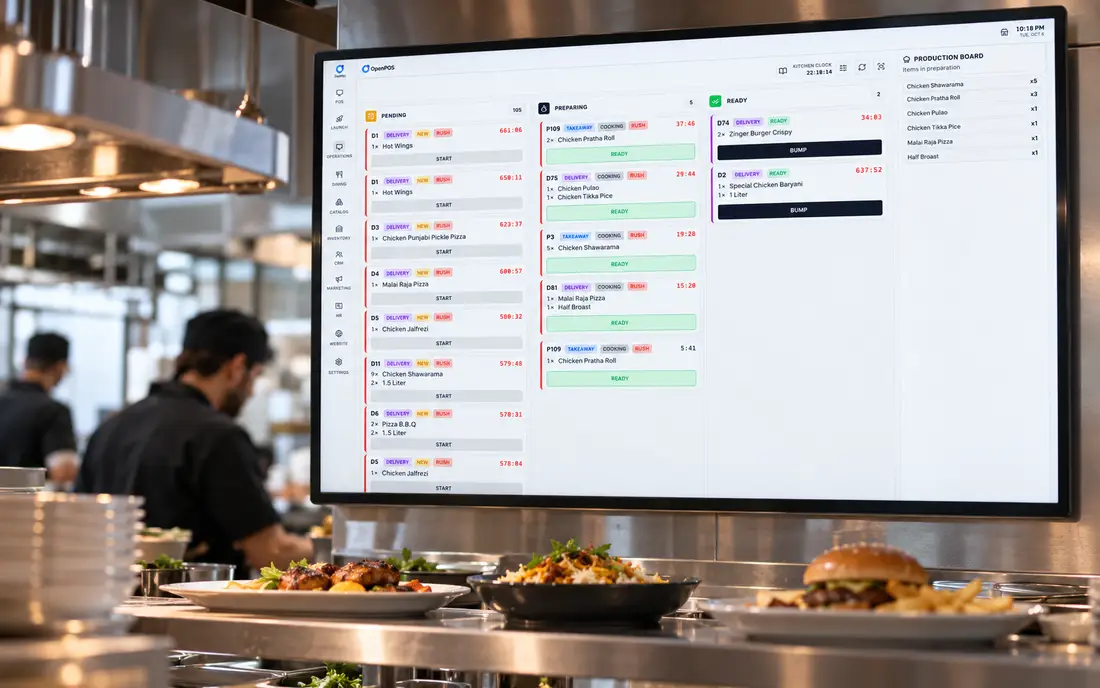
A kitchen display system (KDS) replaces the printed chit and the shouted order with a screen at each station showing exactly what to make and in what order. When the cashier sends an order, it appears in the kitchen instantly; as items are prepared they're bumped off. The payoffs are concrete: fewer lost tickets, less arguing about what was ordered, and a clear view of how long tickets are taking. For a kitchen doing volume, that is the difference between controlled chaos and actual chaos. The kitchen display is a core part of how SureTill runs service.
Recipe inventory and the food-cost leak
Most restaurants lose money in a place they can't see: the gap between what they bought and what they sold. Counting stock once a month tells you it happened, not why. Recipe-based inventory closes that gap by deducting ingredients as dishes are sent to the kitchen, so when a karahi goes out, the chicken, oil and spices come off stock in the right quantities, with unit conversions and portion factors handled for you. Over a week you can see over-portioning, waste and quiet pilferage while they're still fixable. Our inventory & recipe engine is built around deduct-at-kitchen-send precisely because that's where the truth is.
Khata, wallet and closing the drawer
Credit is part of how business is done here, and a paper register is where it leaks. A restaurant POS with a built-in khata and credit ledger keeps a running balance per customer, enforces credit limits, and lets a regular pay down their account or top up a wallet in advance. At the end of the night, work periods and a cash-drawer count reconcile what should be in the till against what is, so a shortfall is a conversation the next morning, not a mystery at the end of the month.
Proof from real kitchens, not a brochure
SureTill wasn't designed in a boardroom. Flavourz, a restaurant, cafe and lounge across three branches in Lahore, runs it through more than 1,000 orders a day, dine-in and delivery. The features above exist because a working restaurant needed them and told us when they weren't good enough. That's also why our demo is a live one: we'd rather show you the system taking a real order and surviving an unplugged router than talk you through slides.
Book a thirty-minute demo and we'll take a live order across dine-in and delivery, fire it to the kitchen display, then unplug the internet and show it all keep working.
Book a free demoFrequently asked
What is the best restaurant POS software in Pakistan?
One that combines offline-first billing, tables and orders, a kitchen display, recipe-level inventory and a khata ledger in a single system, judged on your own floor during a live demo, not a feature sheet.
Does it keep working during load-shedding?
Offline-first restaurant POS runs inside the restaurant, so billing, tables, printing and the kitchen display continue during load-shedding or an outage. Sales sync automatically when power and connectivity return.
Can one POS handle dine-in, takeaway and delivery?
Yes, a capable restaurant POS runs all three from one screen, routes orders to the kitchen display, supports modifiers and split or merged bills, and reports across service types and branches from one dashboard.
Does it help control food cost?
Yes. Recipe inventory deducts ingredients as dishes are sent to the kitchen, so stock reflects what was actually cooked, surfacing waste and over-portioning early and giving you a real food-cost figure.
What is the best restaurant billing software in Pakistan?
One where billing is part of a full POS: it splits and merges bills, handles khata and mixed payments, sends orders to the kitchen, deducts recipe stock and keeps working through load-shedding. Test it on a busy order with the internet unplugged before you choose.
This article is general information for restaurant owners, not tax or legal advice.