
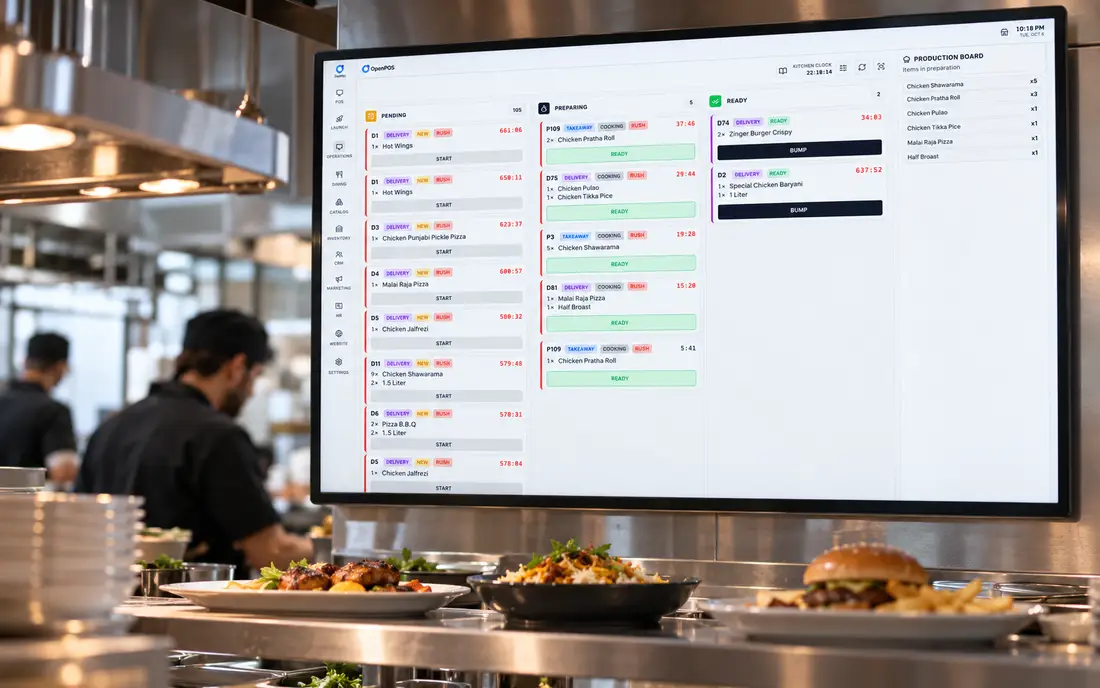
Ask any head chef about their worst service and somewhere in the story is a lost ticket, a slip that fell behind the pass, smudged beyond reading, or printed twice so two cooks made the same dish. A kitchen display system exists to make those failures impossible. It is a screen, but what it really is, is a discipline: one clear queue that everyone on the line can see.
What a kitchen display system is
A kitchen display system, or KDS, is a screen in the kitchen that shows incoming orders as live digital tickets instead of printed paper slips. When an order is placed at the till, on a tablet, or online, it appears on the KDS almost instantly, with its items, quantities, modifiers and the table or order reference. Cooks work the tickets on screen and "bump" each one when it is ready, clearing it from the queue. It is the kitchen-facing half of a modern point-of-sale setup, and it replaces, or backs up, the traditional printed kitchen order ticket.
A KOT (kitchen order ticket) is the order itself, the list of items sent to the kitchen. A KDS is one way to show that order, on a screen; a thermal printer is the other, on paper. Most restaurants use both: screens where the line can see them, a printer at a remote or noisy station.
How a KDS works
The flow is straightforward once you see it. An order is entered anywhere in the system, dine-in table, takeaway counter, delivery channel, and the POS sends it to the KDS. The system routes each item to the correct station: mains to the grill screen, drinks to the bar, desserts to the bakery, so each cook sees only what concerns them. Every ticket carries a timer, and as it ages the colour shifts from calm to urgent, giving the expeditor an at-a-glance read on what is running late. When a dish is plated, the cook bumps it; when the whole order is done, it clears. Modifiers and special requests show inline, cancellations pull the item, and any ticket can be recalled if a plate comes back. In SureTill this is the same engine that drives per-station routing to grill, fryer, tandoor, bar and bakery, you can see it alongside the rest of the modules on the features page.
KDS vs printed KOT
The paper kitchen order ticket has served restaurants for decades, and it still has a place. But a screen does things paper cannot. Paper has no timer, so nobody knows a ticket has been sitting for eleven minutes until a guest complains. Paper jams, runs out, and curls in the heat above a range. A reprint means walking to the printer; a modifier change means a scribbled amendment a cook may miss. A KDS gives you live ageing, clean modifiers, instant recall, per-station filtering and a permanent digital record of every ticket and how long it took.
Plenty of kitchens run both: screens on the line for speed and visibility, with a thermal KOT printer as a backup or for a station that suits paper. SureTill drives standard ESC/POS printers and KDS screens from the same order flow, so you can mix them station by station.
The benefits of a kitchen display system
- Fewer mistakes: legible orders and modifiers, no smudged or lost tickets
- Better timing: colour-coded tickets and recorded prep times you can review
- Calmer stations: each screen shows only that station's items, routed automatically
- A cleaner pass: the expeditor sees the whole order assemble in one place
- Live food-cost control when the KDS is tied to recipe inventory
- No paper, no jams, no ordering rolls at midnight
The gains compound across a service. Ticket times drop because nothing is lost or misread and everyone is working the same visible queue. Errors fall because modifiers are explicit and there is no handwriting to misread. Per-station routing means each cook is not sifting a full order for their two items. Live ageing lets the expeditor push the right table at the right moment instead of guessing. You stop buying receipt rolls for the kitchen and stop losing minutes to printer jams. And because every ticket is timed and stored, you finally have real data on kitchen speed, which dishes drag, which stations bottleneck, which shifts run hot, instead of anecdotes.
For high-volume and delivery-led operations the case is even stronger. A cloud kitchen running several brands off one line essentially cannot function on paper, the KDS is the floor. And because tickets are timed, the kitchen data feeds straight back into how you schedule and where you invest.
How to set one up
Setting up a KDS is less about hardware than about thinking through your stations. Decide how the kitchen divides, grill, fry, cold, bar, bakery, and place a screen where each cook naturally looks. Screens are typically ordinary displays or all-in-one touchscreens mounted at eye level, clear of splash and heat. Then map your menu items to stations in the software so routing is automatic, set your timer thresholds so ageing colours mean something for your food, and decide whether any station keeps a printer as backup. Train the line on the one gesture that matters, bumping a ticket the moment it's done, not a minute later, because a KDS is only as honest as the bumps. Start with one screen at the busiest station if a full rollout feels like a lot; the value is obvious within a shift.
Offline reliability
A blank kitchen screen mid-service is worse than no screen at all, so the KDS has to be as reliable as the range. This is where architecture matters. SureTill is offline-first: the KDS runs on the in-store server's backend and local database, so tickets keep flowing to the kitchen with zero internet and reconcile the moment the connection returns. If your POS pushes the KDS through the cloud, an internet blip can freeze the pass at the worst moment. Read how the offline architecture works to see why the kitchen screen should never depend on a connection you don't control.
This is not a niche worry. Load-shedding in Pakistan, an NBN dropout in Australia or a broadband fault in the UK all look the same from the kitchen: if the screen depends on the cloud, the pass freezes. An offline-first KDS treats the internet as optional for everything except orders that arrive from outside, such as delivery apps.
How SureTill runs the kitchen display
SureTill ships with a kitchen display and KOT printing as standard, not as a paid extra. You route items per station, run screens and thermal tickets side by side on standard ESC/POS printers over USB, LAN or Bluetooth, and keep everything working offline because the server runs inside your restaurant. It sits inside the same system as your billing, tables and recipe inventory, so an order flows from the floor to the kitchen to your food cost without re-keying anything, ingredients deduct the moment the ticket reaches the kitchen, which is covered on the restaurant inventory page.
Orders from every channel land in the same queue: dine-in tables, the takeaway counter, QR table ordering, your own online storefront and Uber Eats, which SureTill integrates with through the official Uber Eats API, so you can accept, reject and mark orders ready without a separate tablet. The same setup runs a three-branch restaurant and lounge in Lahore at over a thousand orders a day per branch, and a bakery and takeaway in Melbourne, the kitchen screen behaves the same in both.
Book a thirty-minute demo. We'll fire orders across stations onto the display, age and bump tickets, then unplug the internet and keep the pass moving.
Book a free demoFrequently asked
What is a kitchen display system?
A screen in the kitchen that shows incoming orders as live digital tickets instead of printed slips. Orders flow from the POS to the KDS, where cooks see items, modifiers and timers and bump each ticket when done.
What is the difference between a KDS and a KOT printer?
A KOT is the order sent to the kitchen; a printer puts it on paper and a KDS puts it on a screen with live timers, colour-coded ageing, clean modifiers and recall, and no paper or jams. Many kitchens run both, a screen at the pass, a printer at a remote station.
What are the benefits of a KDS?
Faster tickets, fewer errors, clear per-station routing, live visibility of wait times, less paper and printer trouble, and real data on kitchen speed.
Can one KDS route orders to different kitchen stations?
Yes. SureTill routes each item to the station that makes it, grill, fryer, tandoor, bar, bakery, so every screen shows only its own work while the pass sees the whole order come together.
Do delivery-app orders show on the kitchen display?
With SureTill, Uber Eats orders come in through the official Uber Eats API, land in the POS and go to the kitchen like any other order. For other delivery apps, ask us which ones we can connect.
Does a KDS work offline?
With SureTill, yes, the KDS runs on the in-store server on your local network, so tickets keep flowing with no internet and reconcile on reconnect. Cloud-only displays stop when the line drops.
General guidance for restaurant owners on kitchen display systems and how they fit a modern POS setup. Features described reflect SureTill as configured for restaurants.